One dilemma many newcomers to crypto face is not fully understanding the extent of control they have over their own funds. Blockchain technology gives everyone the ability to own their assets outright — but most people are unaware that simply using a decentralized application (dApp) grants that app ongoing access to their wallet.
In this guide, we explain what token approvals are, why revoking them matters, and walk you through exactly how to do it — across Ethereum and EVM-compatible chains, as well as Solana — using tools like Etherscan, Revoke.cash, and DeBank.
⚠️  Emergency: Suspect you've been hacked or connected to a drainer site?

Act immediately:
(1) Disconnect your wallet from all dApps.
(2) Open Revoke.cash or Etherscan Token Approval Checker and revoke every approval.
(3) Transfer remaining funds to a fresh wallet.
(4) For Solana, use Sol Incinerator or the Phantom revoke flow (see Solana section below).
(5) Report the malicious site to Google Safe Browsing.
What does ‘revoke approval’ mean?
When you use a DeFi app — say, swapping tokens on Uniswap or lending on Aave — you sign a transaction that gives that app’s smart contract permission to move a certain amount of tokens from your wallet. This permission is called a token approval (or token allowance).
Revoking an approval means cancelling that permission. Once revoked, the smart contract can no longer touch your tokens. This is entirely separate from disconnecting a site from MetaMask — disconnecting only stops the site from seeing your address, but the on-chain approval still exists and is still exploitable until you revoke it on-chain.
Token approval vs token allowance: These terms are often used interchangeably. Technically, the ‘approval’ is the act of granting permission; the ‘allowance’ is the amount permitted. Revoking either means the contract’s spending limit drops to zero.
Why do you need to revoke tokens?
Token approvals are one of the most common attack vectors in DeFi. Here is why they are dangerous:
- Unlimited approvals: Most dApps request unlimited spend limits by default. A single compromised contract can drain your entire token balance.
- Smart contract vulnerabilities: Even legitimate protocols get hacked. The Wormhole bridge (Ethereum ↔ Solana) lost over $300 million in 2022 after attackers exploited an approved contract.
- Rug pulls: Malicious projects create contracts specifically designed to drain wallets once enough users have approved them.
- Phishing / drainer sites: Fake dApp frontends trick users into signing approvals that send funds directly to attackers.
- Abandoned protocols: dApps you no longer use still hold live approvals. If those contracts are ever exploited, your funds remain at risk.
There are several practical reasons to revoke approvals proactively:
- A dApp you recently interacted with has a known vulnerability.
- You no longer plan to use a protocol.
- You are performing a wallet security audit.
- You connected to a site you now suspect was a phishing page.
What are token approvals?
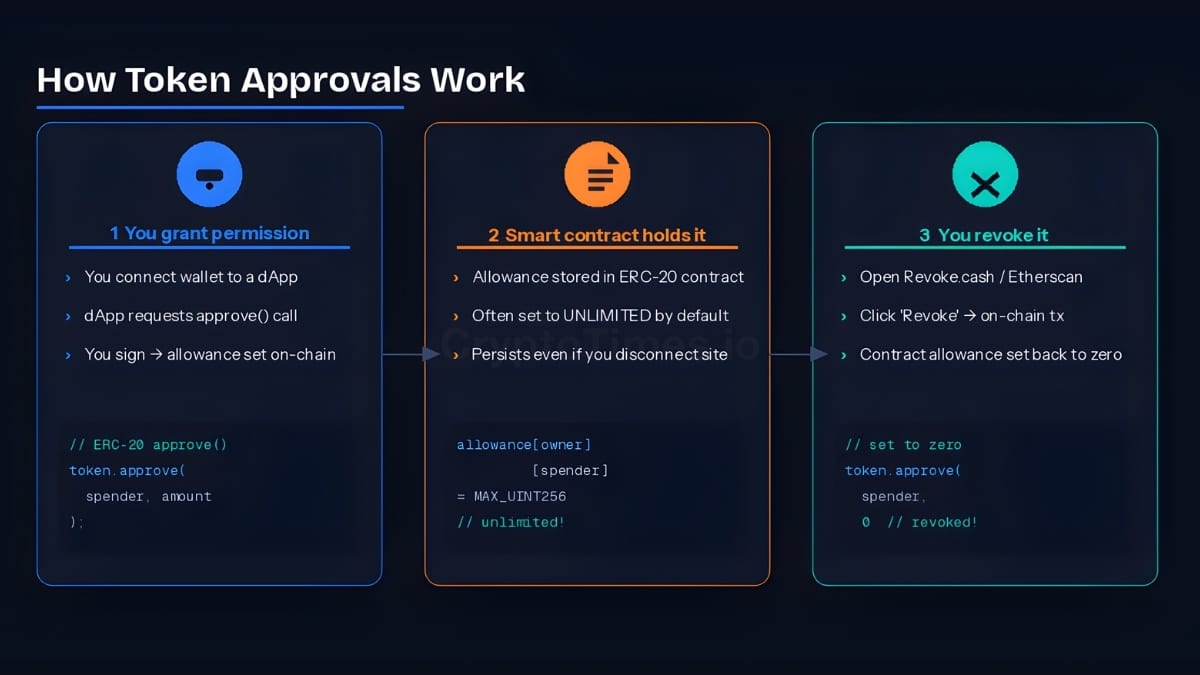
Token approvals are permissions granted by a user to a dApp’s smart contract, allowing it to access tokens in the user’s wallet. On Ethereum, approvals apply to all ERC-20 tokens (ETH, WETH, USDC, etc.) as well as NFTs (ERC-721 and ERC-1155 standards).
Under the hood, approvals work through the ERC-20 approve() function — a standard method that records, on-chain, how many tokens a given contract address may spend on your behalf. When you call approve(), two things are stored: the spender’s address and the allowance amount (often set to the maximum possible value, i.e., an ‘infinite approval’).
Because these permissions live on the blockchain — not in the dApp’s interface — disconnecting a website from your wallet does nothing to revoke them. The contract retains access until you explicitly revoke it with a new on-chain transaction.
Token allowance vs infinite approval

A limited allowance restricts the contract to a specific token amount. An infinite approval (the default for most dApps) allows the contract to spend as many tokens as you hold — now and in the future. Infinite approvals are convenient but represent maximum risk.
How to revoke token approvals on Ethereum and EVM chains
Several trusted platforms let you review and revoke token approvals across Ethereum and EVM-compatible networks, including Polygon, Arbitrum, Optimism, Avalanche, BNB Chain, and Bitrock. Below are the three most widely used options.

Option 1 — Etherscan Token Approval Checker
Best for: Ethereum mainnet users who want a direct, no-frills tool. Visit etherscan.io/tokenapprovalchecker.

- Go to the Etherscan Token Approval Checker.
- Click ‘Connect to Web3’ and connect your wallet (MetaMask, WalletConnect, etc.).
- Use the ERC-20, ERC-721, or ERC-1155 tabs to find the approval you want to remove.
- Click ‘Revoke’ next to the contract.
- Sign the transaction in your wallet prompt.
- The approval is removed once the transaction confirms on-chain.
Arbitrum users

Etherscan also has network-specific versions for Arbitrum (arbiscan.io/tokenapprovalchecker), Polygon (polygonscan.com), and other chains. The same steps apply — just connect on the correct network.
Option 2 — Revoke.cash (multi-chain)
Best for: Users across multiple chains who want a clean dashboard. Visit revoke.cash.
- Open Revoke.cash and click ‘Connect Wallet.’
- Select your network from the dropdown (Ethereum, Polygon, Arbitrum, Optimism, Avalanche, BNB Chain, Bitrock, and many others are supported).
- You will see a full list of your token approvals, organized by network and token type.
- Sort by token value, dApp name, or last activity to identify the riskiest approvals first.
- Click ‘Revoke’ beside any contract you want to remove.
- Confirm the transaction in your wallet.
- Revoke.cash updates your approval list automatically after the transaction completes.
Option 3 — DeBank
Best for: Users who want a broader portfolio view alongside approval management. Visit debank.com.
- Go to DeBank and connect your wallet.
- Click your profile icon, then select ‘Approvals.’
- Review all dApp contracts that currently have token access.
- Click ‘Revoke’ next to any suspicious or outdated approval.
- Confirm the transaction in your wallet.
- DeBank updates your approval list once the transaction is confirmed.
Special case: revoking USDT (Tether) approvals
USDT (Tether) on Ethereum has a known quirk: its smart contract does not allow you to change a non-zero allowance to another non-zero allowance directly. If you try, the transaction will revert with an error.
To revoke or change a USDT approval, you must follow two steps:
- First, set the allowance to 0 (revoke it completely).
- Then, if needed, set the new allowance amount.
Both Revoke.cash and Etherscan handle this automatically when you click ‘Revoke’ — they send a zero-value approval transaction. If you are writing your own transaction, be aware of this two-step requirement. USDC and most other stablecoins do not have this restriction.
Also Read: How to Cancel or Modify Ethereum Pending Transaction?
How to revoke token approvals on Solana
Solana works differently from EVM chains, so a separate approach is needed. Rather than ERC-20 allowances, Solana uses a token account model: every SPL token you hold lives in its own dedicated token account. A dApp that has been delegated authority over a token account can transfer tokens out of it—this is the Solana equivalent of an ERC-20 approval.
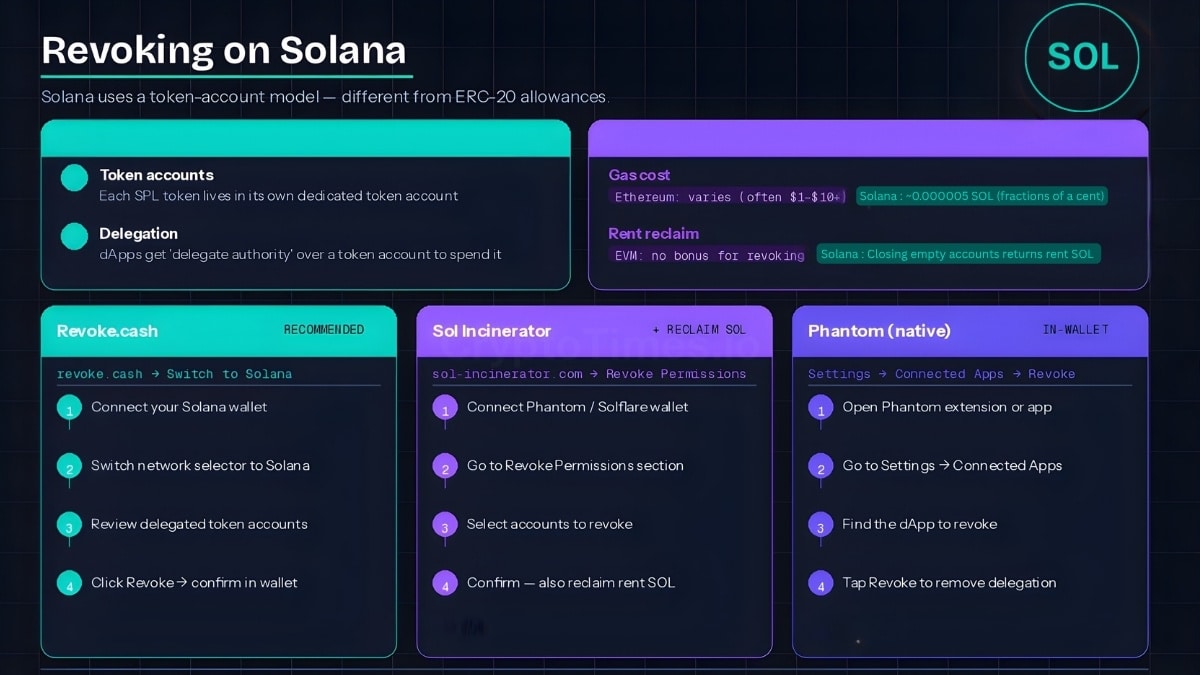
When you connect a wallet to a Solana dApp and sign a delegate transaction, the dApp gains the ability to move tokens from that account up to the delegated amount. Revoking means removing that delegation.
Option A — Revoke.cash (Solana support)
Revoke.cash now supports Solana in addition to EVM chains.
- Open Revoke.cash and connect your Phantom, Solflare, or other Solana wallet.
- Switch the network selector to ‘Solana.’
- You will see a list of delegated token accounts.
- Click ‘Revoke’ next to any account you want to clear.
- Approve the transaction in your wallet.
Option B — Sol Incinerator
Sol Incinerator (sol-incinerator.com) is a Solana-native tool that also lets you close empty token accounts and reclaim the rent SOL locked in them.
- Visit Sol Incinerator and connect your Solana wallet.
- Navigate to the ‘Revoke Permissions’ or ‘Delegations’ section.
- Review the list of delegated accounts.
- Select the ones you want to revoke and confirm the transaction.
Option C — Phantom wallet (native)
- Open the Phantom wallet extension or app.
- Go to Settings > Trusted Apps (or ‘Connected Apps’).
- Find the app whose permissions you want to remove.
- Tap ‘Revoke’ or ‘Remove’ to disconnect it and clear its delegated authority.
Solana vs EVM: key differences

On EVM chains, you pay gas in ETH (or the chain's native token) to revoke. On Solana, revoking is nearly free (a fraction of a cent in SOL). Additionally, closing empty token accounts on Solana actually returns rent SOL to your wallet — a small bonus for cleaning up.
How to revoke MetaMask permissions from dApps
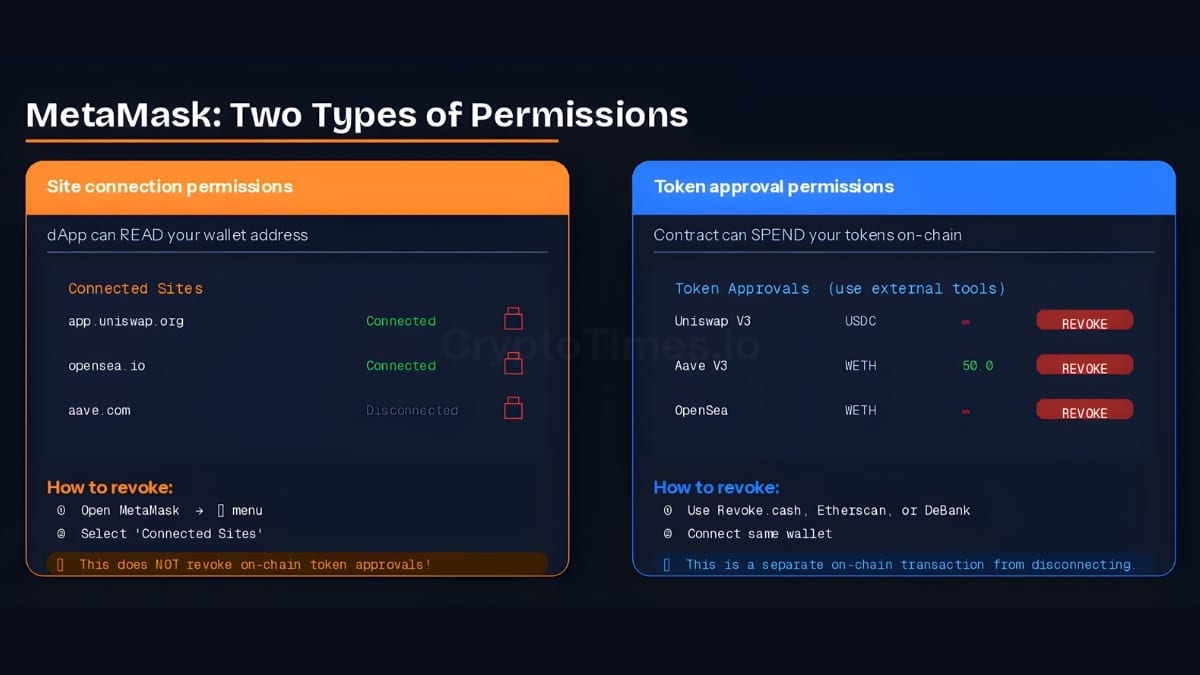
There are two types of permissions in MetaMask: site connection permissions (the dApp can read your address) and token approvals (the dApp’s contract can spend your tokens). These are entirely different and must be revoked separately.
Revoking site connection permissions in MetaMask
This prevents a website from seeing your wallet address. It does NOT revoke on-chain token approvals.
- Open MetaMask and click the three-dot menu (…) in the top right.
- Select ‘Connected Sites.’
- Find the site you want to disconnect.
- Click the trash icon or ‘Disconnect.’
Revoking token approvals (on-chain) via MetaMask
For actual on-chain token approvals, you must use one of the tools above (Etherscan, Revoke.cash, or DeBank) while connected through MetaMask. There is no built-in approval management screen inside MetaMask itself.
Setting a custom spend limit in MetaMask
You can avoid infinite approvals from the start. When a dApp requests token access:
- In the MetaMask approval prompt, click ‘Edit’ next to the requested amount.
- Enter a custom spend limit — ideally the exact amount you need for that transaction.
- Confirm the transaction.
This limits damage if the contract is ever compromised. Most dApps request unlimited by default; it is always safe to reduce this.
Managing ERC-20 token allowances proactively
Beyond revoking old approvals, there are habits you can build to reduce exposure going forward:
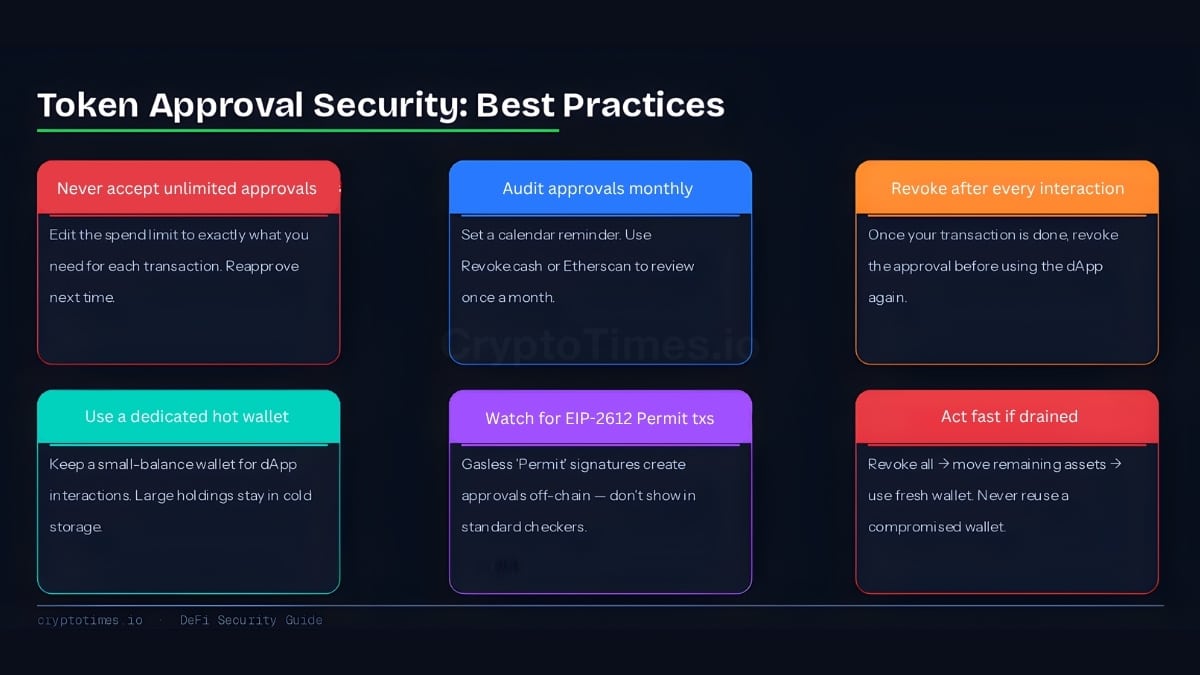
- Never accept unlimited approvals: Always edit the spend limit to the minimum amount needed for the transaction.
- Audit approvals monthly: Set a calendar reminder to review your approvals once a month using Revoke.cash or Etherscan.
- After every new dApp interaction: Revoke the approval once the transaction you needed is complete, before re-approving next time.
- Use a separate hot wallet: Keep a small amount of funds in a dedicated ‘interaction wallet’ for trying new dApps, and larger holdings in a cold wallet that never interacts with contracts.
- Check EIP-2612 / permit() transactions: Newer protocols use a gasless approval standard called EIP-2612, where you sign an off-chain message that grants approval without an on-chain transaction. These do not always show up in standard approval checkers — be cautious when signing ‘Permit’ messages.



Approval management tools compared
| Tool | EVM support | Solana support | Best for |
|---|---|---|---|
| Etherscan | Ethereum mainnet + L2s | No | Direct, auditable revocation |
| Revoke.cash | 100+ EVM chains | Yes | Multi-chain power users |
| DeBank | 30+ EVM chains | No | Portfolio + approval view |
| Phantom (native) | No | Yes | Quick Solana in-wallet revoke |
| Sol Incinerator | No | Yes | Solana + reclaim rent SOL |
Advanced: Speeding up or cancelling a pending revoke transaction
If your revoke transaction is stuck due to low gas fees, you have two options:
- Speed it up: In MetaMask, click the pending transaction and select ‘Speed Up.’ This resubmits the same transaction with a higher gas fee.
- Cancel it: Send a 0-value transaction to your own address using the same nonce but a higher gas fee. The network will process this cheaper transaction first and effectively cancel the original. In MetaMask, click the pending transaction and select ‘Cancel.’
What is a nonce? Every transaction from your wallet has a sequential number called a nonce. By reusing the same nonce with a higher fee, you tell the network to replace the earlier transaction. This is the mechanism behind both speed-up and cancel.
Frequently Asked Questions (FAQs)
What does “revoking a token approval” mean?
Revoking a token approval means removing a smart contract’s on-chain permission to spend or transfer your tokens. Once revoked, that contract can no longer move your assets unless you grant approval again.
Will revoking a token approval cost gas fees?
Yes — revoking is an on-chain transaction and requires a small gas fee paid in the network’s native token (ETH on Ethereum, MATIC on Polygon, etc.). On Solana, the cost is negligible (fractions of a cent). On Ethereum mainnet, gas costs vary with network congestion.
Can I revoke approvals for NFTs too?
Yes. Etherscan and Revoke.cash both manage ERC-721 and ERC-1155 NFT approvals in addition to ERC-20 token allowances. Revoking NFT approvals prevents marketplaces or contracts from transferring your NFTs without your consent.
What happens if I revoke an approval from a dApp I still use?
The dApp can no longer move your tokens. The next time you use it, you will be prompted to approve again — this is normal behavior and does not delete your funds or account.
Does disconnecting a site from MetaMask revoke token approvals?
No. Disconnecting only removes the site’s ability to read your wallet address. The on-chain token approval is entirely separate and remains active until you explicitly revoke it using a tool like Revoke.cash or Etherscan.
How often should I review my token approvals?
A good rule of thumb is once a month, or after every new dApp interaction. Frequent DeFi users should consider a bi-weekly reminder. After connecting to any new or unfamiliar protocol, review and revoke once you are done with the transaction.
What is an infinite approval and should I use it?
An infinite approval (also called an unlimited allowance) allows a contract to spend as many tokens as you hold, now and in the future. Most dApps request this by default for convenience. It is safer to set a custom spend limit equal to the transaction amount and revoke once done.
What is EIP-2612 / a permit() transaction?
EIP-2612 is a newer Ethereum standard allowing gasless approvals via an off-chain signed message rather than an on-chain transaction. These approvals may not appear in standard approval checkers. Be cautious when a dApp asks you to sign a ‘Permit’ message in your wallet — only do so for protocols you trust.
I connected to a drainer site on Solana. What do I do?
Act immediately: open Revoke.cash (Solana mode) or Sol Incinerator and revoke all delegated token accounts. Then transfer remaining tokens and SOL to a fresh wallet you have never connected to any site. Do not reuse the compromised wallet.
In DeFi, you are your own last line of defence.

Revoke old token approvals regularly, limit spend permissions to what you need, and stay alert to phishing sites. A few minutes of wallet hygiene can save you from significant losses.