Phantom Wallet started as a Solana-focused crypto wallet but has since developed into a broader multichain, self-custodial platform.
In 2026, Phantom allows users to store cryptocurrencies, swap tokens, connect to decentralized applications, manage NFTs and Bitcoin Ordinals, stake SOL and move assets across supported blockchains. It has also introduced newer products such as Phantom Cash, perpetual futures, tokenized equities and Solana profit-and-loss tracking.
However, Phantom does not operate like a centralized cryptocurrency exchange. It is a self-custodial wallet, which means users are responsible for protecting their recovery phrase, private keys and transaction approvals.
This guide explains what Phantom Wallet is, which networks it supports, how to set it up, its latest features in 2026, the fees users may encounter and whether Phantom is safe to use.
Key Takeaways
- Phantom is a self-custodial cryptocurrency wallet.
- It supports Solana, Ethereum, Base, Polygon, Bitcoin, Sui, Monad and HyperEVM.
- Users can create a wallet with a recovery phrase or through Google or Apple.
- Phantom supports token swaps, cross-chain transactions, SOL staking, NFTs and Bitcoin Ordinals.
- Newer features include Phantom Cash, perpetual futures, tokenized equities and Solana P&L tracking.
- Phantom does not support custom networks or several major blockchains, including BNB Smart Chain, Arbitrum and Avalanche.
- Phantom is free to download, but network, swap, bridge and third-party payment fees may apply.
What is Phantom Wallet?
Phantom is a self-custodial cryptocurrency wallet available through a mobile application and browser extension.
It allows users to manage digital assets without transferring control of those assets to Phantom. Cryptocurrencies remain recorded on their respective blockchains, while Phantom provides the interface and cryptographic credentials needed to access them.
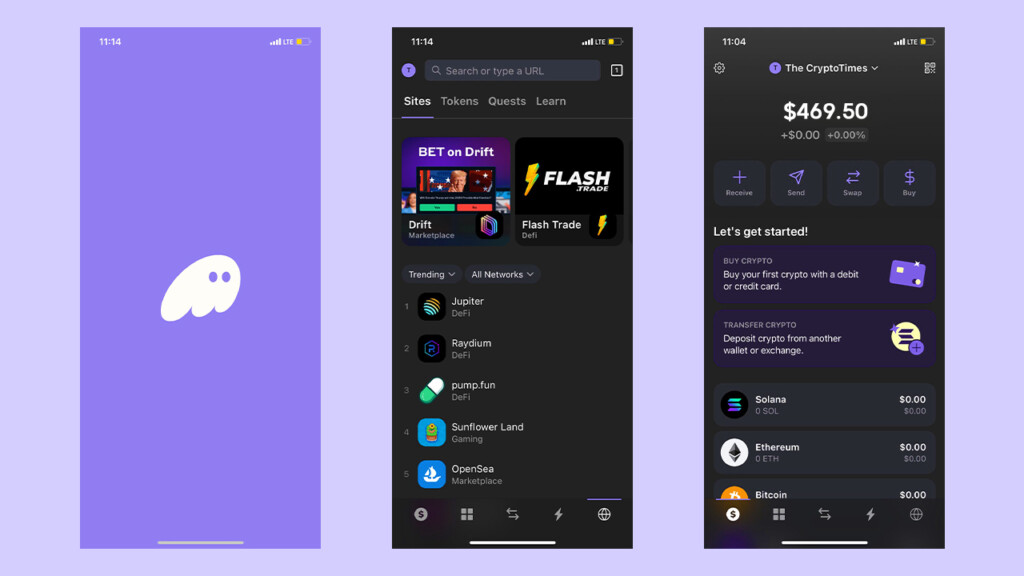
Unlike a centralized exchange, Phantom does not hold customer funds in company-controlled accounts. Users control their wallets through a Secret Recovery Phrase, private keys or an account-recovery method linked to Google or Apple.
This also means Phantom cannot:
- Reverse completed blockchain transactions
- Recover funds sent to the wrong address
- Reset a lost Secret Recovery Phrase
- Recover a wallet without the required credentials
- Cancel transactions processed by third-party services
Although Phantom was initially known as a Solana wallet, that description is now incomplete because the application supports several blockchain networks and financial products.
Which Networks Does Phantom Support?
As of July 2026, Phantom officially supports eight blockchain networks.
| Network | Supported assets and activities |
|---|---|
| Solana | SOL, SPL tokens, NFTs, staking and Solana applications |
| Ethereum | ETH, ERC-20 tokens, NFTs and Ethereum applications |
| Base | ETH and tokens operating on Coinbase’s Layer 2 network |
| Polygon | POL and Polygon-based tokens and applications |
| Bitcoin | BTC, Ordinals and supported Bitcoin assets |
| Sui | SUI, Sui tokens, collectibles and applications |
| Monad | Tokens and applications operating on Monad |
| HyperEVM | Tokens and applications connected to the Hyperliquid ecosystem |
Users can manage supported networks through Settings → Active Networks.
Solana remains permanently enabled, while most other supported networks can be turned on or off.
Networks Phantom Does Not Support
Phantom does not currently support several popular networks, including:
- BNB Smart Chain
- Arbitrum
- Optimism
- Avalanche
- Linea
- Unichain
Phantom also does not allow users to manually add custom blockchain networks or RPC details.
This differs from wallets such as MetaMask, which allow users to configure additional Ethereum Virtual Machine-compatible networks.
Sending tokens to a Phantom address through an unsupported network may make the assets inaccessible inside Phantom. In some cases, users may be able to recover those funds by importing the relevant private key into a compatible wallet.
However, exporting or importing private keys creates additional security risks and should only be done carefully.
Main Features of Phantom Wallet
Feature 1: Self-Custodial Asset Management
Phantom allows users to control their digital assets without relying on a centralized custodian.
Private keys are stored in an encrypted environment associated with the user’s wallet and device. Phantom does not have the complete credentials required to access or transfer a user’s funds.
Each Phantom account includes separate addresses for supported blockchain networks.
Ethereum, Base, Polygon, Monad and HyperEVM use an Ethereum Virtual Machine-compatible account structure. Solana, Bitcoin and Sui use separate blockchain-specific addresses and keys.
Users can create multiple accounts inside Phantom for different purposes, including:
- Long-term crypto storage
- Regular token trading
- NFT activity
- DeFi applications
- Airdrop participation
- Connecting to unfamiliar websites
Keeping long-term holdings separate from wallets used for regular Web3 activity can reduce the amount exposed to malicious applications or approvals.
Feature 2: Recovery Phrase, Google and Apple Wallet Creation
Phantom provides more than one way to create a wallet.
Secret Recovery Phrase
The traditional setup method creates a 12-word Secret Recovery Phrase.
The phrase acts as the wallet’s master backup. Anyone who obtains it may be able to access the wallet and transfer its assets.
Users should write the phrase down in the correct order and store it offline.
Google or Apple Account
Phantom also allows users to create a wallet through a Google or Apple account combined with a four-digit PIN.
Both the linked account and PIN are required for recovery. Phantom says the underlying wallet information is encrypted and distributed so that no single party can access it independently.
A wallet created through Google or Apple still has an exportable recovery phrase. Users should securely store this phrase as an additional backup.
Phantom cannot reset a forgotten PIN or recover a lost recovery phrase.
Feature 3: Phantom Usernames
Phantom allows users to claim a unique username, such as an @handle.
A username provides a simpler alternative to sharing a long blockchain address. It can be linked to public wallet addresses across supported networks.
Phantom usernames may be used to:
- Receive supported cryptocurrencies
- Send payments to other Phantom users
- Access profile-based features
- Use selected Phantom Cash services
- Display a recognizable wallet identity
Users can choose which account receives assets on each network.
However, a username does not replace the underlying blockchain address. It acts as a readable identity connected to that address.
Users should verify the recipient’s username, profile and network before sending a large transaction.
Feature 4: Same-Chain Token Swaps
Phantom allows users to exchange tokens directly inside the wallet.
A same-chain swap exchanges two assets operating on the same blockchain.
Examples include:
- SOL to USDC on Solana
- ETH to USDC on Ethereum
- ETH to another Base token
- SUI to a supported Sui token
Phantom routes transactions through decentralized exchanges and liquidity providers.
Before completing a swap, users should review:
- The token being sold
- The token being received
- Exchange rate
- Price impact
- Slippage
- Minimum amount received
- Network fee
- Phantom fee
- Liquidity-provider charges
Feature 5: Cross-Chain Swaps
Phantom also supports selected cross-chain swaps.
A cross-chain swap allows users to move value from one blockchain to another without manually using a separate bridge.
Examples may include:
- BTC to SOL
- ETH on Ethereum to USDC on Solana
- USDC on Base to SOL
- Assets on Polygon to supported Ethereum assets
Phantom uses third-party infrastructure and bridge providers to identify available routes.
Cross-chain transactions usually take longer than same-chain swaps because they require confirmations on multiple blockchains.
Not every token or blockchain combination is supported.
Users should carefully confirm the source network, destination network, fees and minimum amount received before approving a cross-chain transaction.
Feature 6: Buying Crypto With Fiat Currency
Phantom allows users to purchase supported cryptocurrencies through third-party payment providers.
Depending on the user’s country and provider availability, supported payment methods may include:
- Debit cards
- Bank transfers
- Apple Pay
- PayPal
- Other local payment methods
Phantom does not directly process these fiat purchases.
The third-party provider is responsible for:
- Identity verification
- Payment processing
- Purchase limits
- Exchange rates
- Refunds
- Transaction delays
- Regional eligibility
If a purchase fails or remains pending, the user must normally contact the payment provider that processed the order.
Users should review the final amount of cryptocurrency received, rather than looking only at the quoted market price.
Feature 7: NFTs and Bitcoin Ordinals
Phantom can display and manage supported NFTs across its integrated networks.
Users can:
- View NFTs
- Receive collectibles
- Transfer NFTs
- Connect to NFT marketplaces
- Manage supported Bitcoin Ordinals
- Hide suspicious or spam collectibles
Phantom’s Bitcoin integration supports Native SegWit and Taproot addresses.
Native SegWit addresses generally begin with bc1q, while Taproot addresses generally begin with bc1p.
Native SegWit is commonly used for regular Bitcoin transfers. Taproot addresses are often used for Bitcoin Ordinals and other inscription-based assets.
Users should not assume every token, NFT or Ordinal displayed in their wallet is legitimate. Scam assets may appear without the user purchasing or requesting them.
Feature 8: SOL Staking
Phantom supports both native SOL staking and liquid staking.
Native SOL Staking
With native staking, users delegate SOL to a Solana validator.
The delegated SOL remains locked while the stake is active. Activating or deactivating a stake may take approximately one Solana epoch.
Rewards depend on factors such as:
- Validator performance
- Network conditions
- Commission rate
- Total SOL staked
- Solana inflation
- Stake activation timing
Staking rewards are variable and not guaranteed.
Phantom Staked SOL
Phantom also offers a liquid-staking product called Phantom Staked SOL, or PSOL.
PSOL represents staked SOL while allowing users to retain a transferable token.
Users may be able to hold, swap or use PSOL in supported decentralized-finance applications while the underlying staking position continues earning rewards.
Phantom may charge fees on PSOL staking rewards and when users exit the liquid-staking position.
Users should check the latest fee information inside Phantom before staking.
Feature 9: Ledger Hardware-Wallet Support
Phantom supports selected Ledger hardware wallets.
A hardware wallet stores private keys on a physical device rather than directly inside a browser or mobile application.
Phantom can act as the interface, while the Ledger device is used to approve transactions.
Supported devices may vary between the mobile application and browser extension.
Users should verify Phantom’s latest hardware compatibility before purchasing a Ledger specifically for Phantom.
A hardware wallet can reduce the risk of private-key theft, but it does not protect users from approving malicious smart-contract transactions.
What Is New in Phantom Wallet in 2026?
Solana Profit-and-Loss Tracking
In 2026, Phantom introduced built-in profit-and-loss tracking for supported Solana tokens.
The feature can show:
- Cost basis
- Realized profit or loss
- Unrealized profit or loss
- Total return
- Historical transactions used in the calculation
- Fees included in trading performance
The feature helps users understand how their Solana holdings have performed directly inside the wallet.
However, Phantom’s P&L figures should not automatically be treated as official tax records. Users may still need specialized tax software or professional advice.
Phantom Cash
Phantom Cash is a financial account built into the Phantom application.
It uses CASH, a US dollar-pegged stablecoin operating on Solana.
Depending on eligibility and location, Phantom Cash may allow users to:
- Hold CASH
- Swap supported Solana assets into CASH
- Send payments to Phantom usernames
- Receive payments
- Fund an account through bank transfers
- Withdraw through supported banking methods
- Receive direct deposits
- Use a virtual debit card
- Add the card to Apple Pay or Google Pay
Bank-connected features are limited by jurisdiction and may require identity verification.
Phantom is not a bank, and users should check whether funds connected to Phantom Cash receive any deposit protection before using the service.
Phantom Perps
Phantom Perps allows eligible users to trade perpetual-futures contracts through infrastructure connected to Hyperliquid.
Perpetual futures are derivatives that track the price of an underlying asset without requiring the trader to own that asset.
Phantom Perps may provide:
- Long and short positions
- Leverage
- Crypto markets
- Selected financial markets
- Real-time market information
- Leaderboards
- Performance tracking
- Funding through supported Phantom balances
Perpetual futures are high-risk products.
Leverage can increase both profits and losses. Traders may lose their entire margin if a position is liquidated.
Phantom Perps is not available in every jurisdiction.
Tokenized Equities
Phantom also provides eligible users with access to selected tokenized equities offered by third-party issuers.
Tokenized equities are blockchain-based instruments designed to provide price exposure to:
- Public company stocks
- Exchange-traded funds
- Selected private companies
- Other traditional financial assets
These tokens should not automatically be treated as ordinary shares.
Depending on the issuer, holders may not receive:
- Voting rights
- Direct legal ownership
- Traditional shareholder protections
- Guaranteed dividend rights
- Direct redemption for the underlying shares
Availability depends on the user’s jurisdiction and the terms of the issuing platform.
How to Set Up Phantom Wallet
Step 1: Download Phantom From the Official Website
Users should download Phantom only through its official website.
Phantom is available as:
- An iOS application
- An Android application
- A browser extension
Google Chrome is the primary recommended browser for the extension.
Phantom may work on other Chromium-based browsers, including:
- Brave
- Microsoft Edge
- Opera
However, support may vary.
Firefox no longer receives regular Phantom updates, and Phantom is not officially available for Safari or Tor.
Users should avoid downloading wallet extensions through sponsored search advertisements or unofficial websites.
Step 2: Create a New Wallet
Open Phantom and select Create a New Wallet.
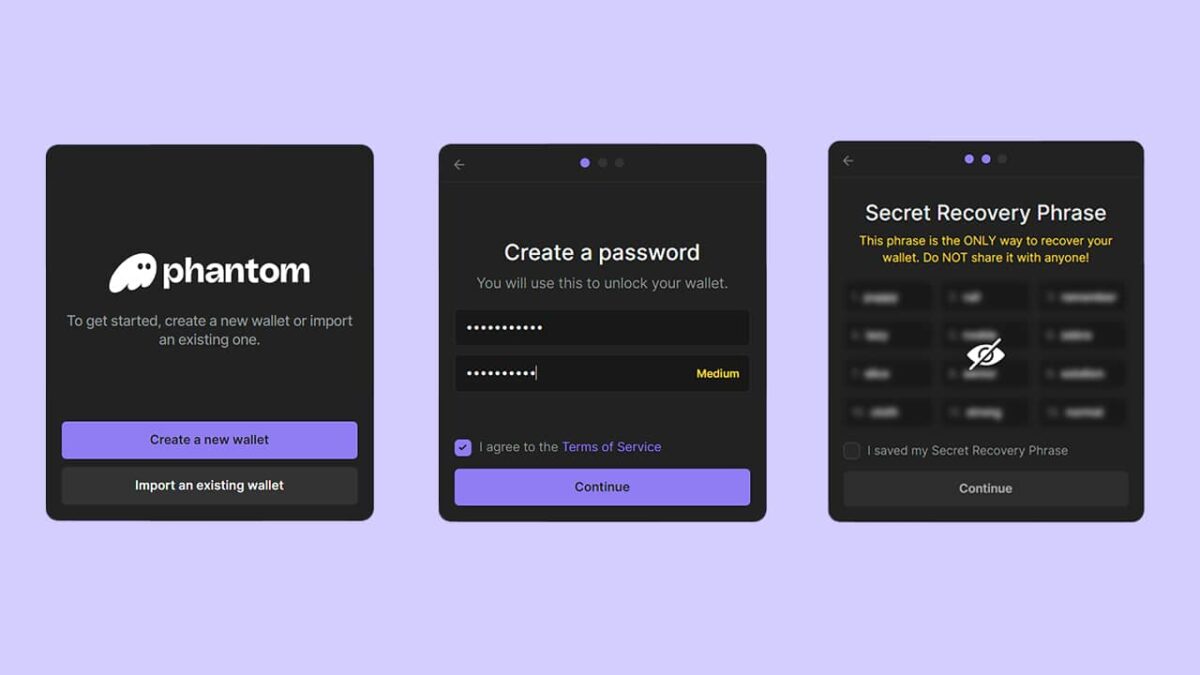
Users can then choose between the available setup methods.
Option 1: Create With a Recovery Phrase
Phantom generates a 12-word Secret Recovery Phrase.
Write down all 12 words in the exact order and store them offline.
Do not save the phrase in:
- Screenshots
- Email drafts
- Cloud storage
- Messaging applications
- Online documents
- Unencrypted password notes
Option 2: Create With Google or Apple
Users can sign in through a Google or Apple account and create a four-digit PIN.
Both the linked account and PIN are required to recover the wallet.
After setup, users should export and securely store the wallet’s recovery phrase as an additional backup.
Step 3: Create a Strong Wallet Password
Browser-extension users must create a local password.
This password unlocks Phantom on that browser and device.
It does not replace the Secret Recovery Phrase.
If the browser is deleted or the device is lost, the password alone cannot restore the wallet.
Users should create a unique password that is not reused on other websites.
Step 4: Enable Device Security
Mobile users should enable available device-security features, including:
- Face ID
- Fingerprint authentication
- Device passcode
- Automatic screen locking
These protections can prevent casual unauthorized access to an unlocked device.
However, they do not replace the wallet’s recovery credentials.
Step 5: Claim a Phantom Username
Users can choose a Phantom username during onboarding or later through the wallet settings.
A username is optional for basic wallet use but may be required for selected profile, payment or Phantom Cash features.
Choose a username carefully because it may become part of the wallet’s public identity.
Step 6: Add Funds to Phantom
To receive cryptocurrency:
- Open Phantom.
- Select Receive.
- Choose the relevant blockchain.
- Copy the displayed wallet address.
- Paste the address into the sending wallet or exchange.
- Select the same blockchain network on the sending platform.
- Confirm the address before withdrawing.
The selected withdrawal network must match the destination network in Phantom.
For example:
- Solana USDC must be sent through Solana.
- Ethereum USDC must be sent through Ethereum.
- Base USDC must be sent through Base.
- Bitcoin must be sent to the appropriate Bitcoin address.
Users should send a small test transaction before moving a large amount.
Step 7: Send Cryptocurrency
To send cryptocurrency:
- Select Send.
- Choose the token.
- Enter or paste the recipient address.
- Select the amount.
- Check the blockchain network.
- Review the network fee.
- Confirm the transaction.
Users should keep a small amount of the network’s native token available to pay transaction fees.
Examples include:
- SOL on Solana
- ETH on Ethereum
- ETH on Base
- POL on Polygon
- SUI on Sui
- BTC on Bitcoin
Step 8: Swap Tokens
To exchange tokens:
- Open the Swap tab.
- Select the token being sold.
- Select the token being received.
- Choose the source and destination networks.
- Enter the amount.
- Review the exchange rate.
- Check slippage and price impact.
- Review Phantom, network and bridge fees.
- Confirm the transaction.
Cross-chain swaps may take longer than same-chain swaps.
Step 9: Connect Phantom to a Decentralized Application
To connect Phantom to a decentralized application:
- Visit the application’s official website.
- Select Connect Wallet.
- Choose Phantom.
- Confirm the account and network.
- Review any requested permissions.
- Approve the connection.
Simply connecting a wallet usually allows the application to view the public address and balances.
Moving assets requires a separate signature or transaction approval.
After using an application, users can disconnect it through Phantom’s connected-app settings.
Disconnecting a website does not always revoke existing token approvals. Users may need to revoke smart-contract spending permissions separately.
Phantom Wallet Fees
Phantom is free to download and does not charge a basic subscription fee.
However, users may encounter several types of charges.
Network Fees
Blockchain validators charge fees to process transactions.
Examples include:
- Solana transaction fees
- Ethereum gas fees
- Base network fees
- Polygon network fees
- Bitcoin miner fees
- Sui transaction fees
Network fees do not normally go to Phantom.
Phantom Swap Fees
Phantom may charge a fee on selected token swaps.
The fee can vary depending on the asset, route, network and transaction type.
Users should review the transaction summary before approving a swap.
Cross-Chain Bridge Fees
Cross-chain transactions may include fees from:
- Bridge providers
- Decentralized exchanges
- Liquidity providers
- Blockchain validators
- Routing services
The cheapest route may not always be the fastest route.
Fiat-Purchase Fees
Third-party fiat providers may charge:
- Card-processing fees
- Bank-transfer fees
- Currency-conversion charges
- Service fees
- Spread on the exchange rate
Users should compare the final cryptocurrency amount received before confirming the purchase.
Staking and Liquid-Staking Fees
Native validators may charge a commission on SOL staking rewards.
Phantom’s liquid-staking product may also charge fees on staking rewards or when users exit PSOL.
Users should review the latest terms inside the application.
Is Phantom Wallet Safe?
Phantom is generally considered a widely used self-custodial wallet, but no software wallet is completely risk-free.
Its safety depends on both the wallet’s security systems and the user’s behavior.
Phantom includes security features such as:
- Transaction previews
- Malicious-domain warnings
- Scam and spam filtering
- Suspicious-token detection
- Transaction simulation
- Unrecognized-application warnings
- Hardware-wallet support
- Biometric device protection
- Connected-application management
However, these safeguards cannot prevent every scam or malicious transaction.
Main Security Risks
Fake Phantom Applications
Scammers may create fake Phantom websites, applications or browser extensions designed to steal recovery phrases.
Users should download Phantom only through its official website.
Phishing Websites
A phishing website may imitate a legitimate decentralized application and ask the user to connect a wallet or enter a recovery phrase.
Phantom support will never need a user’s recovery phrase.
Malicious Transaction Approvals
A transaction may give a smart contract permission to transfer tokens from the user’s wallet.
Users should read transaction details carefully before approving them.
Fake Support Representatives
Scammers may contact users through Telegram, Discord, X or email while pretending to represent Phantom.
Legitimate support representatives should never request:
- A recovery phrase
- A private key
- A Google or Apple recovery PIN
- Remote access to the user’s device
- A transaction to “verify” the wallet
Clipboard Malware
Malware may replace a copied wallet address with an attacker’s address.
Users should compare the first and last characters of the pasted address before confirming a transaction.
Spam Tokens and NFTs
Unknown tokens or NFTs may appear in a wallet without the user requesting them.
Interacting with suspicious assets or following links inside their descriptions may expose the user to scams.
Lost Recovery Credentials
Phantom cannot recover a wallet if the user loses the required recovery credentials.
This is one of the main risks of self-custody.
Phantom Wallet Security Checklist
- Download Phantom only from its official website.
- Never share a recovery phrase, private key or PIN.
- Store recovery credentials offline.
- Avoid saving recovery phrases in screenshots or cloud services.
- Verify website addresses before connecting the wallet.
- Review every transaction before approving it.
- Use separate accounts for long-term storage and Web3 activity.
- Send test transactions before large transfers.
- Disconnect unused applications.
- Revoke unnecessary token approvals.
- Keep the browser, operating system and Phantom application updated.
- Consider a supported hardware wallet for valuable holdings.
- Ignore unsolicited messages claiming to be Phantom support.
- Treat unexpected tokens and NFTs as potentially malicious.
Advantages of Phantom Wallet
- Simple interface for beginners
- Self-custodial control of assets
- Support for eight blockchain networks
- Integrated token swaps
- Cross-chain transaction support
- Native and liquid SOL staking
- NFT and Bitcoin Ordinals management
- Ledger hardware-wallet integration
- Phantom usernames
- Solana profit-and-loss tracking
- Built-in scam and transaction warnings
- Optional access to Phantom Cash and trading products
Limitations of Phantom Wallet
- No support for custom RPC networks
- No support for BNB Smart Chain
- No native support for Arbitrum, Optimism or Avalanche
- Some features are restricted by jurisdiction
- Swap fees may be higher than using protocols directly
- Third-party fiat providers control payment disputes
- It remains a hot wallet without a hardware device
- Phantom cannot recover a lost recovery phrase
- Cross-chain swaps introduce bridge and liquidity risks
- Perpetual futures and tokenized equities carry additional financial risks



Conclusion
Phantom has expanded from a Solana-focused wallet into a multichain self-custodial platform supporting crypto storage, token swaps, staking, NFTs, Bitcoin Ordinals and decentralized applications.
Its 2026 features, including Phantom Cash, Solana P&L tracking, perpetual futures and tokenized equities, show that Phantom is developing beyond basic wallet functionality.
However, users should understand that some of these products carry risks beyond normal crypto storage. Cross-chain swaps depend on bridges, liquid staking depends on smart contracts, perpetual futures involve leverage and tokenized equities may not provide the same rights as traditional shares.
Phantom can be a convenient option for users who want one wallet for multiple blockchain networks. Its interface, transaction previews and security warnings may also make it easier for beginners to manage digital assets.
Nevertheless, self-custody requires personal responsibility. Phantom cannot recover a lost recovery phrase, reverse an incorrect transfer or protect users who approve malicious transactions.
Users should verify networks carefully, protect recovery credentials offline, review every transaction and separate long-term holdings from wallets used for regular Web3 activity.
Frequently Asked Questions
Is Phantom Wallet only for Solana?
No. Phantom supports Solana, Ethereum, Base, Polygon, Bitcoin, Sui, Monad and HyperEVM.
Does Phantom support Bitcoin?
Yes. Phantom supports Bitcoin through Native SegWit and Taproot addresses. It can also manage supported Bitcoin Ordinals.
Does Phantom support BNB Smart Chain?
No. Phantom does not currently support BNB Smart Chain.
Can users add custom networks to Phantom?
No. Phantom does not allow users to manually add custom networks or RPC information.
Can Phantom be used without a recovery phrase?
Users can create a wallet through Google or Apple and a four-digit PIN.
However, the wallet still has an underlying recovery phrase that can be exported and stored as an additional backup.
Can Phantom recover a lost wallet?
Phantom cannot recover a wallet without the required credentials.
A traditional wallet requires its Secret Recovery Phrase. A Google or Apple-created wallet requires access to the linked account and the correct PIN, unless the recovery phrase was previously exported.
Can users stake SOL through Phantom?
Yes. Phantom supports native SOL staking and liquid staking through PSOL.
Can Phantom connect to Ledger?
Yes. Phantom supports selected Ledger hardware-wallet models.
Users should check current compatibility before purchasing a device.
Can Phantom store NFTs?
Yes. Phantom can display and manage supported NFTs, collectibles and Bitcoin Ordinals.
Does Phantom charge swap fees?
Phantom may charge fees on selected swaps. Network, bridge, price-impact and liquidity-provider fees may also apply.
Can users buy crypto inside Phantom?
Yes. Phantom connects users to third-party fiat on-ramp providers.
Available payment methods and fees depend on the provider and the user’s country.
Is Phantom Cash available everywhere?
No. On-chain and bank-connected Phantom Cash services may have different regional restrictions.
Bank transfers, direct deposits and card products are available only to eligible users in supported locations.
Are Phantom Perps available in the United States?
Phantom Perps is restricted in several jurisdictions, including the United States and United Kingdom.
Availability can change, so users should check the application’s latest eligibility information.
Are tokenized equities the same as real shares?
Not necessarily.
Tokenized equities may provide price exposure to a stock or fund, but they may not provide voting rights, legal ownership or traditional shareholder protections.
Can Phantom reverse a transaction?
No. Completed blockchain transactions generally cannot be reversed by Phantom.
What happens if crypto is sent through the wrong network?
The assets may not appear in Phantom.
Recovery may be possible in certain cases by using a compatible wallet, but it depends on the network, asset and address structure.
Disclaimer: This article is provided for educational purposes only and does not constitute financial, investment, legal or tax advice. Cryptocurrency, staking, tokenized assets and derivatives involve significant risk. Product availability, fees and regional restrictions may change.
Disclaimer:
Some elements of this content may have been enhanced with the help of our artificial intelligence (AI) assistants for purposes such as basic refinement, review, image generation, and translation to deliver high-quality news in a shorter time frame. However, all AI-assisted content is reviewed and approved by our team to ensure accuracy, fairness, and editorial integrity.