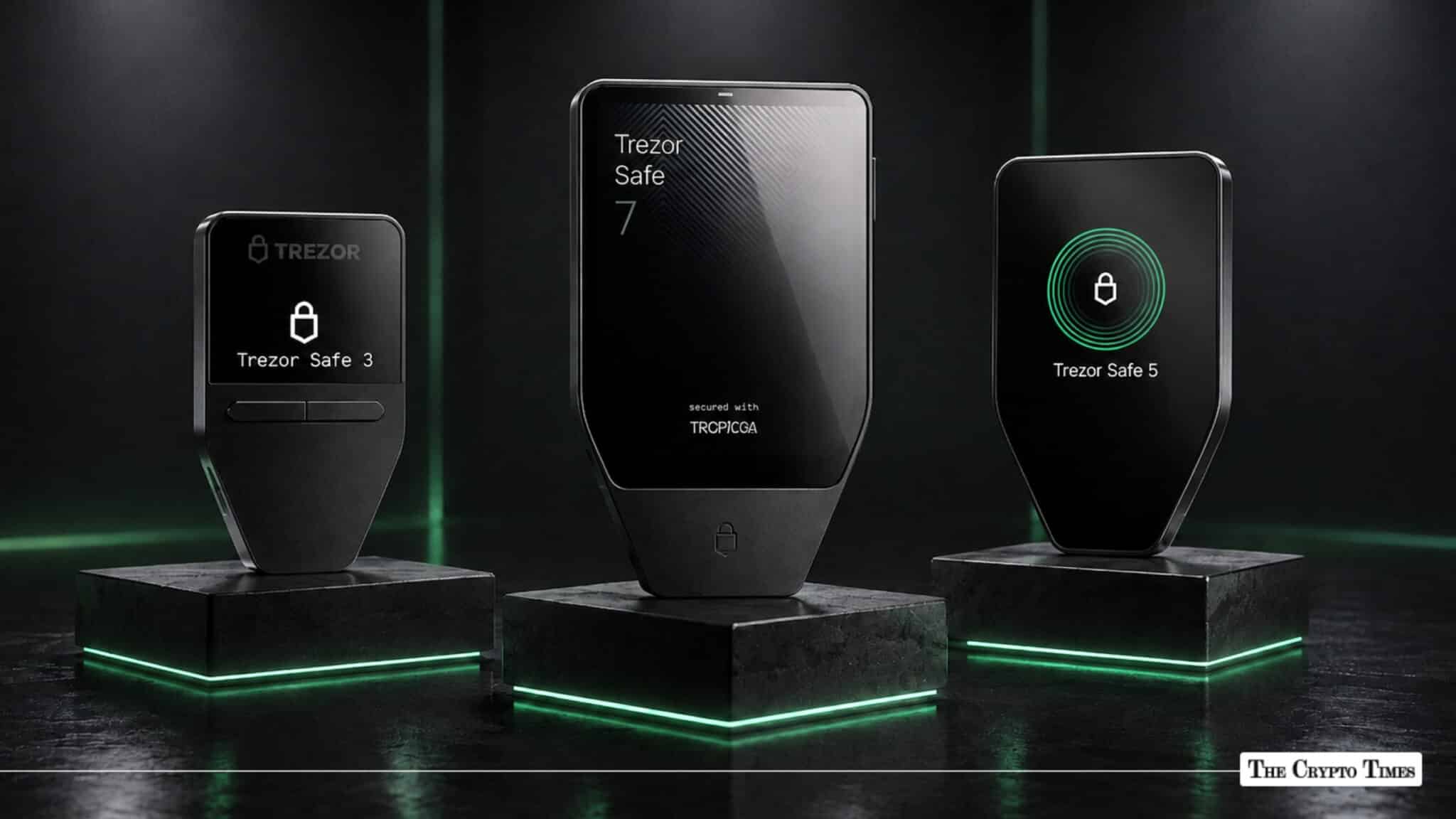
Trezor is the hardware wallet that started it all. Built by Prague-based SatoshiLabs in 2013 and shipped to users in January 2014, it was the first commercially available device designed to store cryptocurrency private keys entirely offline. Over a decade later, Trezor has sold more than 2 million devices across 200+ countries, according to company data.
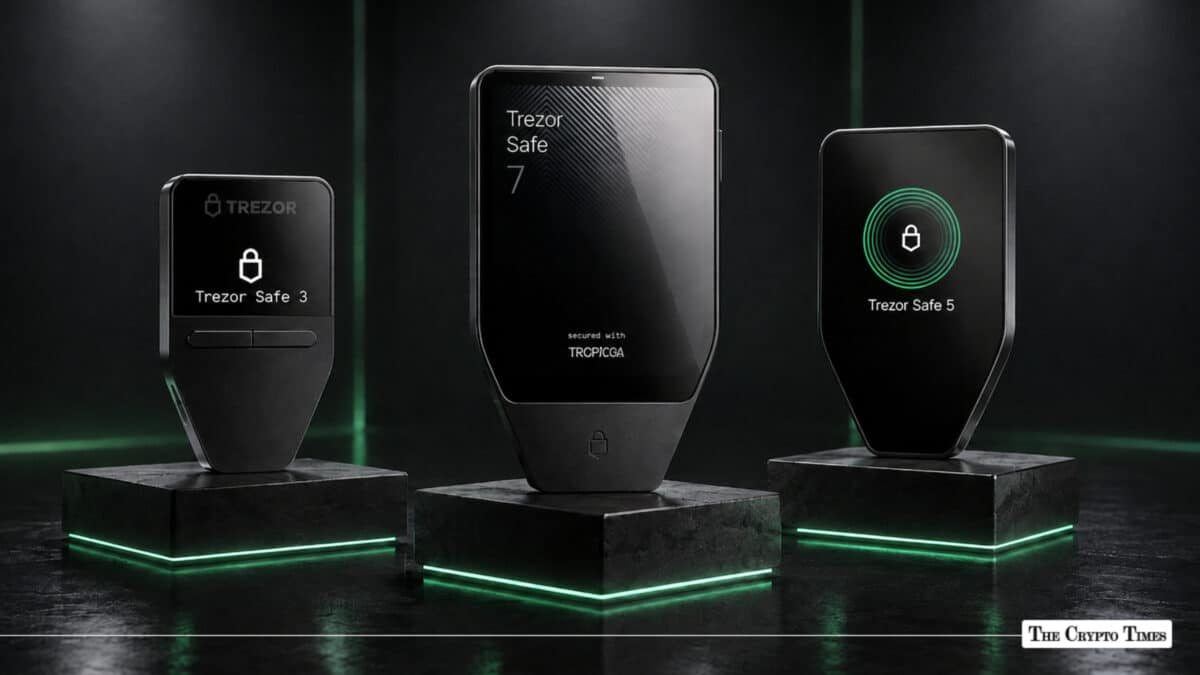
The current lineup consists of three models, Safe 3, Safe 5, and Safe 7, all built around EAL6+ certified secure element chips, open-source firmware, and the Trezor Suite companion app for managing, buying, selling, swapping, and staking crypto. The older Model One and Model T have been discontinued, though they still receive firmware updates.
Key Highlights
- Trezor, launched in 2014 by SatoshiLabs, is the world’s first crypto hardware wallet with over 2 million devices sold globally.
- Three current models: Safe 3 (~$59), Safe 5 (~$129), and Safe 7 ($249), all featuring EAL6+ secure element chips and fully open-source firmware.
- Supports 9,000+ crypto assets across 40+ native coins, including Bitcoin, Ethereum, Solana, Cardano, and XRP.
- Safe 7 introduces Bluetooth, NFC, wireless charging, a 2.5-inch AMOLED display, and post-quantum cryptography readiness via the TROPIC01 open-source secure element.
- The Trezor Suite companion app enables buying, selling, swapping, staking, and DeFi access while keeping private keys fully offline on the device.
This guide covers what a Trezor wallet is, how it works, which model fits your needs, what it supports, and how it compares to Ledger in 2026.
What Is a Trezor Wallet?
A Trezor wallet is a hardware device that stores your cryptocurrency private keys offline, completely isolated from internet-connected systems. It does not store crypto itself. Instead, it stores the cryptographic keys that prove your ownership of assets on the blockchain.
When you want to send or interact with your crypto, the Trezor device signs the transaction internally and sends only the signed output to the network. Your private keys never leave the device and are never exposed to your computer, phone, or the internet.
Trezor was created by SatoshiLabs, a self-funded company with no venture capital backing. The founding team, Marek “Slush” Palatinus and Pavol “Stick” Rusnák, built the original Trezor One as a direct response to the growing number of exchange hacks and phishing attacks in Bitcoin’s early years. As of 2026, Trezor is led by CEO Matěj Žák, while co-founder Marek Palatinus continues as CEO of parent company SatoshiLabs.
Every Trezor device runs fully open-source firmware, meaning any security researcher or developer can audit the code line by line. This transparency is a core differentiator from competitors that use proprietary, closed-source systems.
How Does a Trezor Wallet Work?
A Trezor wallet operates on a simple principle: private keys are generated and stored on an offline chip inside the device, and they never leave it.
Here is what happens when you use a Trezor.
Key generation. When you set up the device for the first time, it generates a random seed phrase (12 or 24 words) using an on-device random number generator. This seed is displayed only on the Trezor screen and is never transmitted to any connected device or server.
Transaction signing. When you want to send crypto, your computer or phone prepares the unsigned transaction and sends it to the Trezor. The device displays the details, recipient address, amount, and fee on its own screen for you to verify. You confirm directly on the device. The Trezor then signs the transaction using your private key internally and returns only the signed transaction to the connected device.
Secure element protection. All current Trezor models (Safe 3, Safe 5, and Safe 7) include an EAL6+ certified secure element chip, the same certification level used in biometric passports and banking cards. This chip protects the PIN, seed, and private keys against physical tampering and side-channel attacks.
Isolation from threats. Because the private keys never touch the internet, Trezor is immune to remote hacking, malware, keyloggers, and phishing attacks that target software wallets. Even if your computer is compromised, the keys remain safe on the device.
Trezor Wallet Models in 2026: Safe 3 vs. Safe 5 vs. Safe 7
Trezor currently sells three hardware wallets. The older Model One (2014) and Model T (2018) have been discontinued but continue receiving firmware updates.
| Spec | Safe 3 | Safe 5 | Safe 7 |
|---|---|---|---|
| Price | ~$59 | ~$129 | $249 |
| Secure Element | EAL6+ (OPTIGA Trust M) | EAL6+ (OPTIGA Trust M) | EAL6+ + TROPIC01 (dual SE) |
| Display | Monochrome OLED | 1.54″ color touchscreen | 2.5″ AMOLED touchscreen |
| Input | Two buttons | Touch | Touch + haptic feedback |
| Connectivity | USB-C | USB-C | USB-C, Bluetooth 5.0+, NFC |
| Charging | USB-powered | USB-powered | Qi2 wireless + USB-C |
| Body | ABS plastic | PC-ABS + Gorilla Glass 3 | Aluminum + Gorilla Glass |
| Water/Dust | No IP rating | No IP rating | IP54 rated |
| Post-Quantum Ready | No | No | Yes |
| Shamir Backup | Yes | Yes | Yes |
| Open Source | Fully | Fully | Fully |
| Coin Support | 9,000+ assets | 9,000+ assets | 9,000+ assets |
Trezor Safe 3: Best Value
The Safe 3 is Trezor’s entry-level secure element wallet. Launched in late 2023, it brought EAL6+ security to Trezor’s most affordable price point. It has a compact design, small monochrome display, two physical buttons, and USB-C connectivity. Available in five colors: Cosmic Black, Stellar Silver, Solar Gold, Galactic Rose, and a limited-edition Bitcoin Orange.
The trade-off is convenience. There is no touchscreen, no Bluetooth, and no battery. Every interaction requires a USB cable. For users who connect their hardware wallet occasionally to verify a DCA purchase or move funds to cold storage, these are minor inconveniences.
Trezor Safe 5: Best for Most Users
The Safe 5 occupies the middle of the lineup and is widely considered the best balance of features and price. Its 1.54-inch color touchscreen makes confirming transactions, entering PINs, and navigating menus noticeably faster than the Safe 3. Haptic feedback provides physical confirmation of touch inputs, and Gorilla Glass 3 protects the display.
It connects via USB-C only, with no wireless option. For desktop-first users who manage crypto from a laptop or PC, this is rarely a limitation.
Trezor Safe 7: Flagship
The Safe 7, announced in October 2025 and shipping since November 2025, is Trezor’s most advanced device. It is the first Trezor to offer Bluetooth, NFC, and wireless charging, and the first hardware wallet with post-quantum cryptography readiness.
Key additions over the Safe 5 include a larger 2.5-inch AMOLED touchscreen, an aluminum body with IP54 dust and water resistance, Bluetooth 5.0+ for wireless phone pairing, Qi2 wireless charging with a built-in LiFePO4 battery, and the TROPIC01 chip, Trezor’s own open-source secure element designed as the world’s first fully auditable SE.
For users with significant holdings or those who want full iOS mobile signing support without cables, the Safe 7 is the flagship choice.
Trezor Suite: The Companion App
Every Trezor device works with Trezor Suite, a free companion app available on desktop (Windows, macOS, Linux), web browser, and mobile (iOS and Android). Trezor Suite is where you manage your portfolio, send and receive crypto, and access advanced features — all while your private keys stay on the device.
Core functions include:
Buying, selling, and swapping crypto through vetted third-party providers integrated directly into the app. Staking support for Ethereum, Cardano, and Solana, with an on-screen dashboard for managing rewards. WalletConnect integration for connecting to DeFi protocols like Uniswap, Aave, and OpenSea while maintaining hardware-level security. CoinJoin for Bitcoin privacy, Tor support for network-level anonymity, and coin control for advanced UTXO management.
The April 2026 update (v26.4.2) introduced full Ethereum staking on mobile, a unified Buy/Sell/Swap interface, OTC concierge trading for transactions over $50,000, and enhanced phishing detection with configurable dust filtering. The June 2026 update added DEX swaps on mobile, Tron support for all users, and a network filter in the asset view.
Trezor Suite does not require KYC for holding, sending, or receiving crypto. KYC may be required for buy/sell transactions through integrated providers, but that data flows directly between you and the provider — Trezor does not collect or store it.
Supported Coins, Tokens, and Blockchains
Trezor wallets support over 9,000 crypto assets in total, according to CoinLaw and multiple third-party reviews. This includes 40+ natively supported coins in Trezor Suite, 1,500+ named cryptocurrencies, and thousands of ERC-20 (Ethereum) and SPL (Solana) tokens.
Natively supported in Trezor Suite: Bitcoin, Ethereum (and all ERC-20 tokens), Solana, Cardano, XRP, Litecoin, Dogecoin, Tron, Ethereum Classic, and others.
Supported via third-party wallets: Some assets like Monero (XMR) and Tezos (XTZ) are supported by Trezor firmware but require external wallet apps such as MetaMask, Rabby, Electrum, Backpack, or Exodus. When using third-party apps, your private keys still remain on the Trezor device.
Supported networks span major Layer-1 and Layer-2 blockchains, including Bitcoin, Ethereum, Solana, Cardano, Polygon, Arbitrum One, Base, Avalanche, BNB Chain, Tron, and others.
The full and updated list is maintained at trezor.io/coins.
Key Security Features
Trezor’s security architecture goes beyond storing keys offline. Here is what protects your assets.
EAL6+ Secure Element
All three Safe models embed a certified secure element chip that guards the PIN, seed phrase, and private keys against physical extraction, fault injection, and side-channel attacks. This is the same certification level used in biometric passports and banking infrastructure.
TROPIC01 Dual Secure Element (Safe 7 Only)
Trezor’s custom-designed, fully open-source secure element. It is the first SE chip where both hardware design and firmware can be independently audited, addressing a longstanding criticism of the hardware wallet industry’s reliance on closed-source chips.
Fully Open-Source Firmware
Trezor’s entire codebase — firmware, bootloader, and hardware schematics — is publicly available for audit. SatoshiLabs has maintained this policy since 2014. Any security researcher can verify that no hidden backdoors or vulnerabilities exist.
PIN Protection and Auto-Wipe
A user-defined PIN is required to access the device every time it connects. After 16 incorrect attempts, the device wipes itself completely, preventing brute-force attacks.
Recovery Seed Backup (BIP39 / SLIP39)
A 12-word or 24-word seed phrase backs up the entire wallet. Trezor also supports Shamir Backup (SLIP-39), which splits the seed into multiple shares — for example, 3-of-5 — so no single written backup can compromise the wallet if stolen or exposed.
Passphrase Protection (Hidden Wallets)
An optional additional passphrase acts as a “25th word,” creating a completely separate hidden wallet. Even if someone obtains your seed phrase, they cannot access the hidden wallet without the passphrase.
Firmware Verification at Boot
The bootloader checks firmware signatures at every startup. If the firmware doesn’t match SatoshiLabs’ official signature, the device displays a warning before proceeding, alerting you to potential tampering.
Post-Quantum Cryptography (Safe 7 Only)
The Safe 7 is designed with cryptographic primitives that are resistant to potential future quantum computing attacks — a forward-looking measure as the industry prepares for post-quantum threats.
How to Set Up a Trezor Wallet
Setting up a new Trezor takes roughly 10 to 15 minutes.
- Step 1: Unbox and connect. Plug the Trezor into your computer or phone via USB-C (or pair via Bluetooth for Safe 7). Navigate to trezor.io/start.
- Step 2: Install Trezor Suite. Download the desktop app or use the web version. The app will detect your device and guide you through setup.
- Step 3: Create a new wallet. The device generates your seed phrase and displays it on screen, one word at a time. Write each word down on the included recovery card. Never store it digitally — not on your phone, not in a screenshot, not in cloud storage.
- Step 4: Verify the seed. The device asks you to confirm several words from your seed to ensure you recorded them correctly.
- Step 5: Set a PIN. Choose a PIN code. This will be required every time you connect the device.
- Step 6: (Optional) Add a passphrase. For advanced users, enable passphrase protection to create a hidden wallet layer.
- Step 7: Start using. Your Trezor is ready. You can receive crypto by sharing your wallet address, buy directly through Trezor Suite, or connect to DeFi via WalletConnect.
Trezor vs. Ledger: 2026 Comparison
Trezor and Ledger are the two most established hardware wallet brands. Here is how they compare in 2026.
| Feature | Trezor (Safe 5) | Ledger (Stax) |
|---|---|---|
| Price | ~$129 | ~$399 |
| Secure Element | EAL6+ (OPTIGA Trust M) | EAL6+ (ST33K1M5) |
| Firmware | Fully open-source | Closed-source (proprietary) |
| Display | 1.54″ color touch | 3.7″ curved E-ink touch |
| Connectivity | USB-C | USB-C, Bluetooth |
| Companion App | Trezor Suite | Ledger Wallet |
| Native Coin Support | 9,000+ assets | 5,500+ assets |
| Staking | ETH, ADA, SOL | ETH, SOL, DOT, ATOM, others |
| Shamir Backup | Yes | No |
| WalletConnect | Yes | Yes |
| Company Funding | Self-funded, no VC | VC-backed |
Open source vs. closed source is the fundamental philosophical divide. Trezor publishes its entire firmware for public audit. Ledger uses a proprietary secure operating system (BOLOS) that cannot be independently verified by external researchers. Both approaches have trade-offs: open source enables community auditing but exposes code to potential attackers; closed source limits external review but may contain proprietary protections.
Shamir Backup is a meaningful differentiator. Trezor’s SLIP-39 implementation lets you split your recovery seed into multiple shares (e.g., 3-of-5), so losing one backup doesn’t compromise your wallet. Ledger does not offer an equivalent feature.
For a more detailed breakdown, read: Trezor Safe 7 Unveiled: Sets New Standard for Self-Custody
Who Should Use a Trezor Wallet?
Trezor is designed for anyone who wants to take custody of their own crypto rather than leaving it on an exchange. That said, certain user profiles benefit most.
Long-term holders who buy and hold Bitcoin, Ethereum, or other assets and want cold storage security without active management. The Safe 3 is ideal here.
Active self-custody users who regularly interact with DeFi, stake assets, or swap tokens while keeping keys offline. The Safe 5 balances features and price for this workflow.
High-value portfolio holders who need premium security, mobile signing, and wireless connectivity. The Safe 7’s dual secure element, Bluetooth, and post-quantum architecture are built for this use case.
Privacy-focused users who value CoinJoin, Tor integration, and open-source transparency.
Trezor is not designed for day trading or high-frequency transactions. Hardware wallets add a confirmation step to every transaction, which adds time. For active trading, an exchange or software wallet is more practical—Trezor is where you move assets for long-term security.
Frequently Asked Questions
What cryptocurrencies does Trezor support in 2026?
Over 9,000 assets, including 40+ native coins in Trezor Suite (Bitcoin, Ethereum, Solana, Cardano, XRP, Dogecoin, Tron, and more) plus thousands of ERC-20 and SPL tokens. Full list at trezor.io/coins.
What happens if I lose my Trezor?
Your crypto is not lost. Recover your entire wallet by entering your seed phrase into a new Trezor device. If you used Shamir Backup, you’ll need the required number of shares. Without the seed phrase, recovery is impossible.
Is Trezor fully open source?
Yes. Firmware, bootloader, and hardware schematics are all publicly available. The Safe 7’s TROPIC01 secure element is also open-source, a first in the industry.
Does Trezor require KYC?
No KYC for holding, sending, or receiving crypto. Buy/sell features through integrated providers may require identification depending on your region. That data goes to the provider, not to Trezor.
How does Trezor compare to Ledger?
Both are trusted hardware wallet brands. Trezor is fully open-source and supports Shamir Backup for split-seed recovery. Ledger uses proprietary firmware and offers Bluetooth on more models. Choice depends on whether you prioritize code audibility or specific features.