Crypto Times Logo Black
Google News Follow Banner
  • News
    • Market
    • Bitcoin
    • Ethereum
    • Altcoins
    • Regulations & Policies
    • DeFi News
    • Blockchain News
    • Industry
  • Exclusive
  • Opinion
  • Learn
    • Explained
    • How To
    • Insights
  • Podcasts
  • More
    • About Us
    • Our Authors
    • Contact Us
    • Editorial Policy
The Crypto TimesThe Crypto Times
  • All News
  • Market
  • Bitcoin
  • Ethereum
  • Altcoins
  • Regulations & Policies
  • Blockchain
  • DeFi
  • Industry
  • Exclusive
  • Opinion
Search
  • News
    • Market
    • Bitcoin
    • Ethereum
    • Altcoins
    • Regulations & Policies
    • Blockchain
    • DeFi
    • Industry
    • Exclusive
    • Opinion
  • Learn
    • Explained
    • How To
    • Insights
  • Quick Links
    • About Us
    • Our Authors
    • Contact Us
    • Editorial Policy
    • AI Policy
    • Sponsored & Advertorial Policy
  • Podcasts
Follow US
© 2026 By Crypto Times. All Rights Reserved.
DeFi News

Master Your Pi Wallet: Setup, Security, Troubleshooting Tips

Written By:
Dishita Malvania

Reviewed By:
Jahnu Jagtap

Last updated: November 25, 2025 4:54 PM
Published August 2, 2024 12:37 AM
Share
Last updated: November 25, 2025 4:54 PM
Published August 2, 2024 12:37 AM
Master Your Pi Wallet: Setup, Security, Troubleshooting Tips

Pi Network continues its exciting journey with its revamped Pi Wallet and as it moves closer to its Mainnet migration, every Pioneer needs to grasp how to create, use, and secure their Pi Wallet effectively. This comprehensive guide breaks down everything you need to know about the pi wallet for seamless transactions and robust security.

Creating your Pi Wallet

Access the Pi Browser:

Open the Pi Network mining app, tap the menu icon (three horizontal lines) in the upper left corner, and select “Pi Browser.” Next, choose “Sign into Pi Browser.”

Download the Pi Broswser App:

If you haven’t installed it yet, download the Pi Browser the iOS App Store or Google Play Store. This app is crucial for accessing Pi Network’s ecosystem, including managing your transactions.
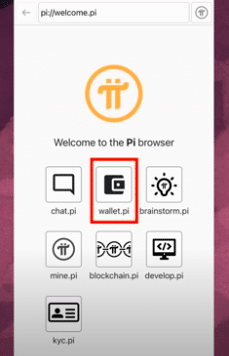
PI Wallet Interface
Source: Pi Wallet

Generate your Wallet:

In the Pi Browser, go to the Pi Directory and select  “Wallet.pi.” Tap “Generate Wallet” and ensure you complete this process without navigating away. Your wallet and passphrase will be generated here.
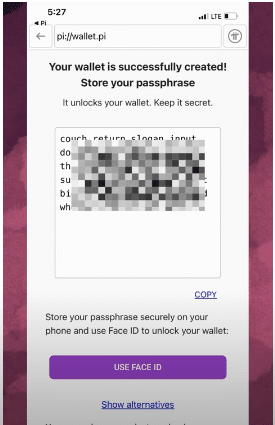
PI Wallet : - Generate Wallet

Securing your Wallet

Safeguard your Passphrase:

Your passphrase is the key to accessing your wallet. Pi Network does not store it, so losing it means losing access to your assets. Use biometric features like Face ID or fingerprint for ease of access, but remember that these won’t transfer if you lose your phone.

Keep your Passphrase Private:

Never share your passphrase with anyone. The wallet address is your public identity on Pi blockchain (Public Key). Only share your public Wallet address, which is used for receiving Pi or interacting with your wallet.
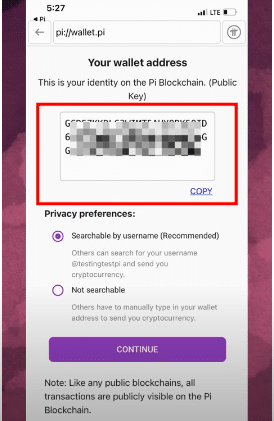
piblockchain

Navigating your Wallet

Login: After setting up, return to the Pi Browser, tap “Pi Wallet,” and log in using your passphrase or biometric authentication.

Receiving Pi: To receive Pi, copy your public Wallet address from the Wallet interface and share it with others.

Sending Pi: Input the recipient’s wallet address and the amount to transfer. Be cautious to avoid sending Pi to the wrong address. Transactions incur a minimum fee of 0.01 Pi, adjustable based on network congestion.

Test Transactions: Practice with the Testnet wallet by sending Test-Pi, which holds no real value.

What to do if your Pi Wallet gets Hacked?

With the surge in Pi coin activity, scams and hacking attempts have increased. Here’s how to handle such situations: 

If you sent Pi coins to a Scammer:  

Unfortunately, if you’ve sent Pi to a scammer, there’s no way to recover your funds. This highlights the importance of cautious transactions. Your wallet remains secure, and you can continue to receive coins from future migrations.

If you shared your Passphrase:

If you have shared your passphrase or entered it on a suspicious site, follow these steps: 

  1. Create a new wallet – Open the Pi Browser, navigate to the wallet section, and set up a new wallet. Back up your new passphrase securely.
  2. Update your wallet – In the Pi Network app, confirm your new wallet by entering passphrase in the mainnet checklist.
  1. Monitor your old wallet – Transfer any remaining coins from your old wallet to the new one before the scammer can access them.

Avoiding future scams:

Always verify you are on the legitimate Pi Network website, which should end in “.com” (e.g., wallet.pi.com). Avoid deceptive sites with similar names.

Recovering your Passphrase

Securing your passphrase:

Initially, keep your passphrase secure. Use your device’s biometric features for ease but note that these won’t help in recovering your passphrase.

Accessing your passphrase:

If you’ve forgotten your passphrase but can still access your wallet via biometric authentication, view it through the wallet’s settings.

Reacting your passphrase:  

If your Pi is migrated and connected to the mainnet, be cautious when recreating your wallet. Disconnect from the mainnet, recreate your wallet, and reconnect it.

Migrating your passphrase:

After setting up your new wallet, use the migration feature to transfer Pi from the testnet to the mainnet.

With this guide, you’re equipped to create, manage, and secure your Pi Wallet, ensuring a smooth experience as you engage with the Pi Network. Also always remember to DYOR before interacting with anything.

Also Read: Pi Wallet Adds Fiat Onramp via Onramper for Easy PiCoin Purchase

Disclaimer: The information researched and reported by The Crypto Times is for informational purposes only and is not a substitute for professional financial advice. Investing in crypto assets involves significant risk due to market volatility. Always Do Your Own Research (DYOR) and consult with a qualified Financial Advisor before making any investment decisions.

Follow The Crypto Times on Google News to Stay Updated!      Google News
Google News Banner

TAGGED:Pi Network
Share This Article
Whatsapp Whatsapp LinkedIn Telegram Copy Link
Dishita Malvania - Senior crypto journalist at The Crypto Times
By Dishita Malvania
Follow:
Dishita Malvania is a Crypto Journalist with 3 years of experience covering the evolving landscape of blockchain, Web3, AI, finance, and B2B tech. With a background in Computer Science and Digital Media, she blends technical knowledge with sharp editorial insight. Dishita reports on key developments in the crypto world—including Litecoin, WazirX, Solana, Cardano, and broader blockchain trends—alongside interviews with notable figures in the space. Her work has been referenced by top digital media outlets like Entrepreneur.com, The Independent, The Verge, and Metro.co, especially on trending topics like Elon Musk, memecoins, Trump, and notable rug pulls.
Jahnu Jagtap - Crypto Research Analyst at The Crypto Times
By Jahnu Jagtap
Follow:

Jahnu Jagtap is a Research Analyst with over 5 years of experience in crypto, finance, fintech, blockchain, Web3, and AI. He holds a BSc in Mathematics and is certified in Blockchain and Its Applications (SWAYAM MHRD), Cryptocurrency (Upskillist), and NISM Certifications. Jahnu specializes in technical, on-chain, and fundamental analysis, while also closely tracking global macro trends, regulations, lawsuits, and U.S. equities. With a strong analytical background and editorial insight, he drives content that delivers clarity and depth in the fast-evolving world of digital finance.

Latest News

OKX Introduces Agent Payments Framework for On-Chain Commerce
Circle Introduces Nanopayments System for Ultra-Small USDC Transfers
Senator Tillis Seeks to Move Crypto Clarity Act Forward in Committee
Trust Wallet Adds Hyperliquid Perps with 0% Fees for 3 Months
Pi Coin Slips After Testing 200-Day Moving Average

Find Us on Socials

You may also like

DeFi United Emerges as Industry Response to Kelp DAO Crisis, Restoring Aave Confidence

DeFi United Emerges as Industry Response to Kelp DAO Crisis, Restoring Aave Confidence

Aftermath Finance Perps on Sui Exploited for $1.14M

Aftermath Finance Perps on Sui Exploited for $1.14M

How a ‘Perfect Storm’ of 3 Bugs Led to ZetaChain’s $333K GatewayEVM Exploit

How a ‘Perfect Storm’ of 3 Bugs Led to ZetaChain’s $333K GatewayEVM Exploit

Syndicate Commons Bridge Falls Victim to a Fresh DeFi Exploit: ~$400K Stolen

Syndicate Commons Bridge Falls Victim to a Fresh DeFi Exploit: ~$400K Stolen

The Crypto Times Logo PNG

Providing real-time, accurate Crypto reporting. Your trusted source for Crypto News and Research.

Stay Updated

All News
Exclusive
Opinions
Learn
Podcasts

Company

About Us
Our Authors
Editorial Policy
AI Policy
Advertorial Policy

Get In Touch

Contact Us
Career

Find Us on Socials

X-twitter Linkedin Telegram Youtube Instagram

© 2026 The Crypto Times | A BITROCK TECHNOLOGIES L.L.C. Company.

DMCA.com Protection Status
  • Terms and Conditions
  • Disclaimer
  • Privacy Policy
  • Cookie policy
Do Not Sell or Share My Personal Information